Corner-Point Grid
A Corner-Point grid (CPG) is a three-dimensional structured grid widely used in reservoir simulation to represent complex geological structures. The grid is defined on a logical indexing system \((i, j, k)\), which determines cell connectivity independently of geometric shape. This separation of topology and geometry allows the grid to retain a structured layout while accommodating highly irregular, non-orthogonal, and non-conforming grids geometries, such as faults and stratigraphic discontinuities.
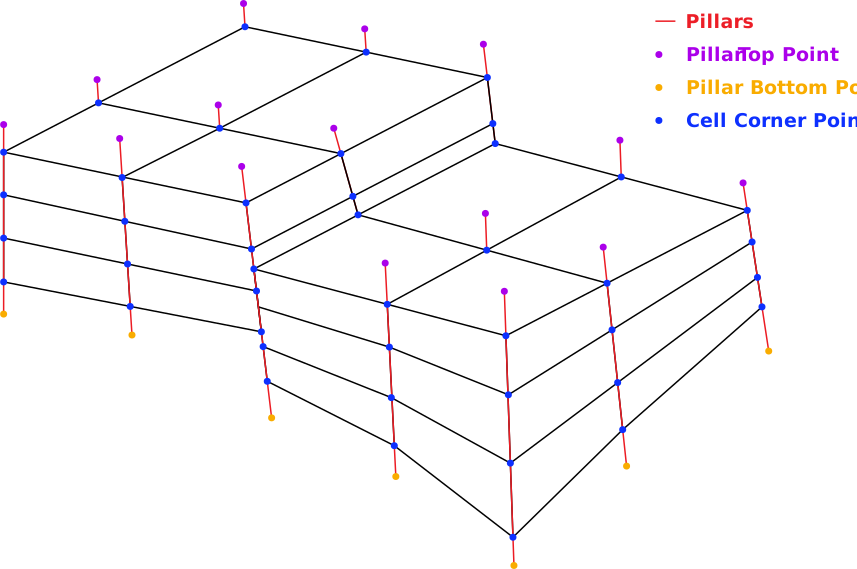
Figure 5 Example of a non-conforming Corner-Point grid with dimensions \(4 \times 2 \times 3\), corresponding to \((i, j, k)\).
In a Corner-Point grid, each cell is defined by eight corner points forming a general hexahedron. The geometry of each cell is described by the Cartesian coordinates of these corners, allowing cells to be non-orthogonal, skewed, inclined, and spatially variable in size and shape while remaining structured in logical space. Compared with Rectilinear grids, this representation requires additional geometric information.
Although each cell is conceptually defined by eight corner points, these coordinates are not stored independently. Since adjacent cells share common corners, explicitly storing full \((x, y, z)\) coordinates for every corner would introduce redundancy and may lead to inconsistencies due to numerical precision. Instead, the geometry is defined implicitly and reconstructed from pillar geometry and corner depth values.
Pillar Geometry
The grid is supported by a set of vertical or inclined pillars arranged on an \((i, j)\) lattice. Each pillar is defined by two endpoints in three-dimensional space: a top point \((x_{\mathrm{top}}, y_{\mathrm{top}}, z_{\mathrm{top}})\) and a bottom point \((x_{\mathrm{bot}}, y_{\mathrm{bot}}, z_{\mathrm{bot}})\). Pillars define the lateral structure of the grid and act as reference lines for locating corner points, but they are not sufficient on their own to fully define cell geometry.
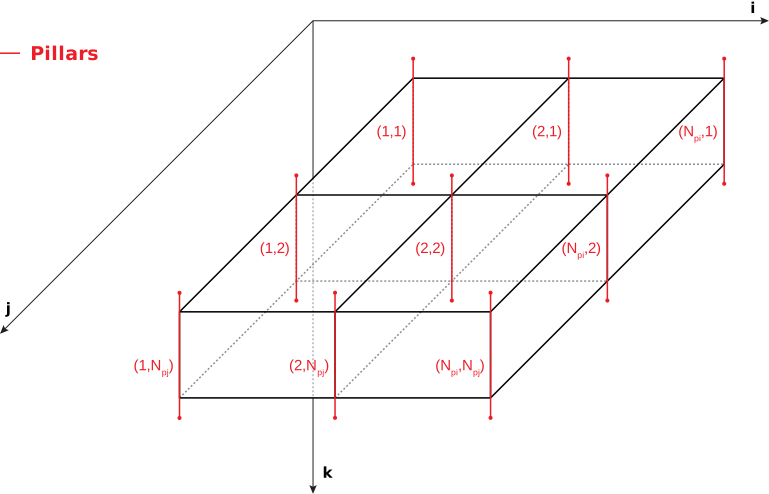
Figure 6 Pillar arrangement and indexing on the \((i, j)\) lattice; \(P_i\) and \(P_j\) denote the number of pillars in the \(i\) and \(j\) directions.
Cell Interpolation
Corner coordinates are obtained by interpolating along pillars using corner depths provided in the grid definition. For a corner located at depth \(z_c\), its relative position along the pillar is defined as:
where pillar endpoints are defined as \((x_{\mathrm{top}}, y_{\mathrm{top}}, z_{\mathrm{top}})\) and \((x_{\mathrm{bot}}, y_{\mathrm{bot}}, z_{\mathrm{bot}})\). The parameter \(t\) represents the fractional distance along the pillar, where \(t = 0\) corresponds to the top and \(t = 1\) corresponds to the bottom. The full three-dimensional coordinates of the corner are obtained by linear interpolation:
This formulation ensures that each corner lies exactly on its associated pillar and that neighboring cells sharing a pillar produce identical corner coordinates. A complete grid cell is constructed by applying this interpolation to all eight corners using the appropriate pillar and corner depth values.
Representation in Eclipse
In Hopsin simulator, Corner-Point grids are defined using DIMENS, COORD, ZCORN keywords, and optionally ACTNUM keyword.
This set of keywords that separately describe topology, geometry, and cell activity.
Keyword |
Definition |
Size |
Logical Shape |
|---|---|---|---|
COORD |
Pillar endpoint coordinates (top and bottom) |
\(6 (N_i + 1)(N_j + 1)\) |
\((N_j + 1, N_i + 1, 6)\) |
ZCORN |
Corner depth values for all cells |
\(8 N_i N_j N_k\) |
\((2N_k, 2N_j, 2N_i)\) |
ACTNUM |
Cell activity mask (active/inactive) |
\(N_i N_j N_k\) |
\((N_k, N_j, N_i)\) |
DIMENS
The DIMENS keyword specifies the grid dimensions
and defined in RUNSPEC section of the Eclipse input file.
It defines the number of grid cells in each coordinate direction
required to correctly reconstruct the grid topology.
\(N_i\) — number of cells in the \(i\) (x) direction
\(N_j\) — number of cells in the \(j\) (y) direction
\(N_k\) — number of layers in the \(k\) (z) direction
In the Eclipse input file, the dimensions are defined in the order \((N_i, N_j, N_k)\):
RUNSPEC

DIMENS
 4 2 3
/
COORD
The COORD keyword defines the geometry of grid pillars by specifying
the top and bottom endpoints of each pillar.
The number of pillars is determined from grid dimensions as:
Thus, the total number of pillars is \((N_i + 1)(N_j + 1)\). Each pillar is represented by six values:
Accordingly, the logical shape of the COORD array is \((N_j + 1,\; N_i + 1,\; 6)\)
and the total number of stored values is \(6 (N_i + 1)(N_j + 1)\).
ZCORN
The ZCORN keyword stores the corner depth values for all grid cells.
For a grid of size \((N_i, N_j, N_k)\), the total number of entries is \(8 N_i N_j N_k\).
This corresponds to the number of corner points along each axis:
The factor of 2 arises because each cell contributes two corner positions along each axis (e.g., left/right, front/back, top/bottom). Thus, the logical array shape is \((2N_k,\; 2N_j,\; 2N_i)\).
Although neighboring cells share physical corner points, ZCORN stores
corner depths per cell (Figure 7). This allows representation of non-conforming
geometries such as faults and pinch-outs.
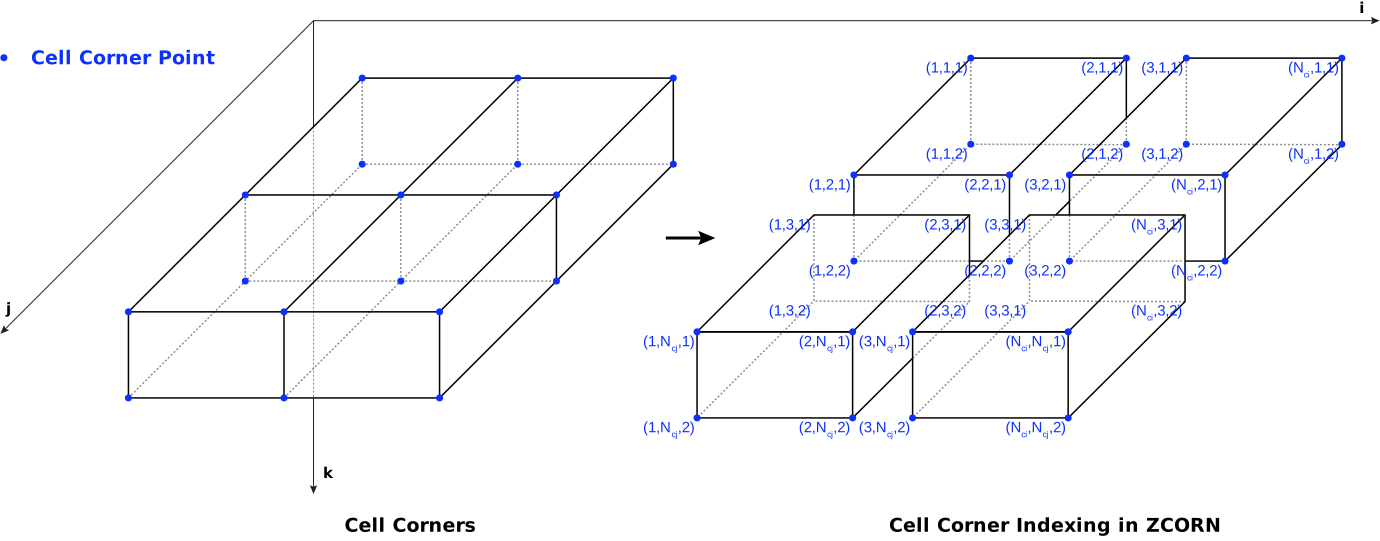
Figure 7 Example of \((i, j, k)\) cell corner indexing in ZCORN (here \(N_j = 1\)).
ACTNUM
The ACTNUM keyword defines the activity status of each grid cell.
1→ Active (included in simulation)0→ Inactive (excluded from simulation)
It does not modify the geometry defined by COORD and ZCORN. Instead, it acts as a mask over the defined cells, determining which cells participate in the simulation.
Note
This keyword is optional; if omitted, all cells are assumed active.